





How to configure a large stage LED screen
Configuring a Large Stage LED Screen
Determine the Screen Size and Resolution
Decide on the size and resolution of the LED screen based on the requirements of your event or performance. Consider the viewing distance of the audience to ensure optimal visibility.
Key Considerations:
- Audience Viewing Distance: Tailor the screen size and resolution for clarity.
- Event Requirements: Match the resolution to the content quality.
- Optimal Visibility: Ensure all audience members can see clearly.
Plan the Screen Layout
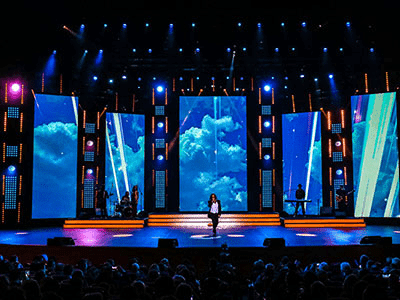
Determine the layout of the LED screen, including its position on the stage, whether it will be a single screen or multiple screens, and any additional structures required for installation.
Layout Planning Tips:
- Positioning: Place the screen(s) for optimal viewing angles.
- Single vs Multiple Screens: Choose configurations that enhance the experience.
- Support Structures: Plan for any scaffolding or truss systems.
Arrange Power Supply
Ensure that there is a sufficient power supply to support the LED screen. Calculate the power requirements based on the screen size and the number of LED panels.
Power Supply Considerations:
- Capacity: Assess the total power draw of the setup.
- Distribution: Use appropriate distribution boards and generators if needed.
- Safety Compliance: Adhere to local electrical codes and standards.
Install LED Panels
Install the LED panels on the stage or the supporting structure. Follow the manufacturer’s instructions for proper installation. Ensure the panels are securely fastened and aligned correctly.
Installation Best Practices:
- Manufacturer’s Instructions: Follow guidelines for correct assembly.
- Secure Fastening: Use the recommended hardware for stability.
- Alignment: Ensure all panels line up perfectly for seamless visuals.
Connect the LED Panels
Connect the LED panels to the control system using the provided cables. Ensure that the connections are secure and properly routed to avoid any interference or loose connections.
Connection Guidelines:
- Secure Connections: Prevent accidental disconnections.
- Cable Routing: Organize cables neatly to minimize tripping hazards.
- Signal Quality: Use high-quality cables for reliable transmission.
Set Up the Control System
Install and set up the control system for the LED screen. This may involve connecting a video processor or media server, configuring the display settings, and mapping the LED panels to match the desired content layout.
Control System Setup:
- Video Processor/Server: Connect and configure for content distribution.
- Display Settings: Adjust parameters for optimal performance.
- Panel Mapping: Ensure each panel displays the correct segment of the content.
Test the Rental LED Display
Turn on the LED screen and test its functionality. Check for any dead pixels, color calibration issues, or other defects. Make any necessary adjustments to ensure the display is working correctly.
Display Testing Procedures:
- Initial Power-Up: Confirm the screen turns on properly.
- Dead Pixels and Defects: Inspect for any faulty elements.
- Adjustments: Correct any issues identified during testing.
Calibrate the Rental LED Screen
Use calibration tools to adjust the color, brightness, and contrast settings of the LED screen for optimal visual quality. This step may require professional assistance to achieve accurate calibration.
Calibration Techniques:
- Color Accuracy: Use calibration tools for precise color correction.
- Brightness and Contrast: Set levels that suit the venue lighting.
- Professional Help: Consult experts for complex adjustments.
Test the Content
Display various types of content on the LED screen, such as videos, images, and live feeds, to ensure compatibility and proper display. Make any necessary adjustments to the content settings to optimize visual output.
Content Testing Checklist:
- Video Formats: Verify supported file types and resolutions.
- Live Feeds: Check for latency and signal strength.
- Adjustments: Fine-tune content for the best visual experience.
Implement Safety Measures
Ensure that the LED screen is properly secured and meets safety regulations. Install necessary safety features, such as protective barriers, to prevent accidents or damage during the event.
Safety Measures:
- Secure Mounting: Prevent the screen from tipping or falling.
- Regulatory Compliance: Adhere to safety standards and guidelines.
- Protective Barriers: Shield the screen from accidental impacts.
Conduct a Final Check
Perform a final inspection of the LED screen, connections, and control system to ensure everything is functioning correctly. Make any last-minute adjustments or fixes as needed.
Final Inspection Steps:
- Comprehensive Check: Verify all components are operational.
- Last-Minute Adjustments: Address any remaining issues before the event.
Monitor and Maintain
Regularly monitor the LED screen during the event to ensure continuous operation. Implement a maintenance plan to address any issues that may arise during or after the event.
Monitoring and Maintenance:
- Continuous Supervision: Keep an eye on the screen throughout the event.
- Maintenance Plan: Schedule regular checks and cleaning post-event.
Conclusion
To successfully configure a large stage LED screen, consider the screen size and resolution, plan the layout, arrange power supply, install and connect the LED panels, set up the control system, test the display and content, calibrate the screen, implement safety measures, conduct a final check, and monitor and maintain the setup. Consulting with professionals experienced in LED screen configuration and installation can help ensure the best results for large-scale events.